
Introduction: Why Conversion Tracking Decides Whether Your Ads Actually Work
Every ad platform, Google, Meta, TikTok, is trying to do one job well: find more people who will do what you want them to do. To do that job, it relies entirely on the information you feed it back. If all you evertell it is "someone clicked," it will go find you more clicks, including empty ones. If you tell it "this exact person became a paying customer, and here is what they were worth," it gets dramatically better atfinding people likely to do the same thing.
This single idea, feeding the algorithm better information about what actually matters, is what sits underneath every term covered in this guide: Enhanced Conversions, Enhanced Conversions for Leads, offline conversion import, Click IDs, and server-side tracking. None of these are separate,unrelated features. They are all different pieces of the same underlying job: telling the ad platform, as accurately and completely as possible, who really converted.
Why This Became Urgent in Recent Years
For a long time, ad platforms relied heavily on browser cookies, small files that quietly track a visitor across pages and days, to figure out who clicked an ad and whether that same person later bought something. Two things changed that. First, browsers like Safari introduced strict privacy protections (Apple calls its version Intelligent Tracking Prevention) that limit how long cookies can be used for this kind of tracking. Second, phone operating systems began asking users directly whether an app or website can track them across other apps, and many people say no.
The practical result: a meaningful share of real conversions started becoming invisible to advertisers,not because those sales stopped happening, but because the old tracking method could no longer seethem. Enhanced Conversions and server-side tracking exist specifically to recover that missingvisibility, using a first-party relationship (your own website or CRM sending data directly) instead of relying on a browser cookie that may no longer survive long enough to do the job.
KEY TAKEAWAY
Every concept in this guide solves the same underlying problem: making sure adplatforms know about real conversions, even when browser cookies alone can no longer reliably track someone from their first click to their eventual purchase.
Part 1: The One Question That Decides Your Entire Tracking Setup
Before choosing any tool or feature, one question settles almost every other decision in this guide:does the real "sale" happen right there on the website, the moment someone clicks a button?Or does it happen later, somewhere else entirely, like a phone call, a chat conversation, or abank transfer?
Case A: The Sale Happens ON the Website
An online store selling shoes. A visitor picks a pair, enters their card details, and pays right there.The website itself knows the exact second the sale happened, because the transaction took place inside it.
Case B: The Sale Happens AWAY from the Website
A driving school. A visitor fills out a short form asking for more information. Three days later, astaff member calls, the person agrees to join, and pays through a bank transfer. The websitenever directly witnessed the actual payment, it only witnessed the initial interest.
Where Common Business Types Fall
This split shows up across almost every industry. The table below maps common business models to which case they fall into, and which section of this guide applies to them.
| Business Type | Where the Sale Happens | Relevant Section |
|---|---|---|
| E-commerce store, direct checkout | On the website (Case A) | Part 3 |
| Course, coaching, or academy business | Away from website (Case B) | Part 2 |
| Local services (contractors, clinics, salons) | Away from website (Case B) | Part 2 |
| SaaS with free trial converting to paid | Mixed (Case A + B) | Parts 2 & 3 |
| Real estate or high-ticket B2B | Away from website (Case B) | Part 2 |
| Subscription box / membership site | On the website (Case A) | Part 3 |
Notice that the deciding factor is never the industry itself, it's where the actual money changes hands.Two businesses that look similar on the surface can need completely different tracking setups if one takes payment online and the other closes deals over a call.
KEY TAKEAWAY
Find out where the real sale happens before setting up anything. If it happens on the website itself, go to Part 3. If it happens later, somewhere else, go to Part 2. Manybusinesses genuinely need both.
Part 2: Enhanced Conversions for Leads — The Complete Guide
This section is for Case B businesses: the ones where someone shows interest now, but only becomesa real paying customer days, weeks, or sometimes months later, somewhere the website itself cannever see.
2.1 The problem this solves
Enhanced Conversions for Leads is the modern version of this idea. It is, more precisely, an upgraded form of an older feature called offline conversion import: reporting back to an ad platform,after the fact, that a specific lead turned into a specific sale worth a specific amount. Enhanced Conversions for Leads improves on the classic version by also allowing securely scrambled (hashed) personal details, like an email address, to be sent alongside the ticket number, as a backup way of matching the sale to the original click.
The bakery analogy
Picture a bakery handing out free samples on the street, right beside its ad banner. Some people who try a sample walk into the shop days later and buy an entire cake. The person handing out samples has no way of knowing, on their own, who eventually bought. So instead, every sample comes with a small numbered ticket. If someone later buys a cake and hands over that ticket, the shop can finally connect the dots: "this sale actually came from the person handing out samples outside." Without the ticket, every one of those delayed sales would look, to the ad platform, like it never happened at all.
2.2 Click IDs: The "Numbered Ticket" Explained
In the online world, the numbered ticket from the bakery example is called a Click ID. It is a unique code automatically attached to the web address someone lands on the moment they click an ad.Different platforms use different names for their version of this code:
GCLID (Google Click ID) — used for ads clicked on Google Search, Shopping, and Display.
GBRAID and WBRAID — Google's versions of the click ID used specifically for app-related and privacy-restricted browser environments, such as certain iOS traffic.
FBCLID (Facebook Click ID) — Meta's equivalent, attached when someone clicks a Meta (Facebook or Instagram) ad.
TTCLID (TikTok Click ID) — TikTok's equivalent, attached when someone clicks a TikTok ad.
Every one of these plays the exact same role as the bakery's numbered ticket: a short code that lets a platform reconnect a later event back to the exact original ad click, even if that later event happens somewhere completely different, like a phone call or a CRM.
2.3 How the ID actually gets captured and stored
For any of this to work, the Click ID has to be captured the moment someone lands on the page, and then saved somewhere permanent, usually as a field attached to that person's record inside a CRM (the system that stores your leads and customers). This typically happens through a small piece of automation on the landing page: as soon as the page loads, it looks for the Click ID sitting in the web address, and writes it into a hidden field on the lead form, so that when the form is submitted, the Click ID travels along with the rest of the lead's details straight into the CRM.
A word of caution
This capture only works at the exact moment the lead first arrives. If the Click ID is not capturedand stored right then, on that first visit, it cannot be recovered later. A common, invisible failurehere is a URL redirect, sending a visitor from one page to another before they reach the form,that accidentally strips the Click ID off the address along the way. If leads are missing their Click ID more often than expected, this is one of the first places to check.
2.4 Two Ways to Match a Sale Back to Its Ad Click
There are two distinct ways to tell an ad platform "this sale belongs to that earlier click":
Click ID matching — sending back the exact GCLID, GBRAID, WBRAID, FBCLID, or TTCLID that was captured and stored at the very first visit.
Hashed data matching — sending back securely scrambled versions of the person's email,phone number, or name, which the ad platform compares against its own records of who clicked or engaged with an ad.
Click ID matching is precise, but fragile: if the ID is lost, never captured, or expires (see 2.5 below), that conversion has nothing to match against, and silently fails to attribute, even though the sale itself wascompletely genuine. Hashed data matching is less exact but far more resilient, since it doesn't depend on a single code surviving intact through weeks of CRM activity. This is exactly why Enhanced Conversions for Leads is considered an upgrade over relying on Click ID matching alone: sending both together means that even when the Click ID gets lost along the way, there is still a real chance of acorrect match through the hashed identity data instead.
KEY TAKEAWAY
Whenever possible, send both the Click ID and hashed contact details together for every offline conversion. The Click ID is the precise match; the hashed data is the safety net underneath it.
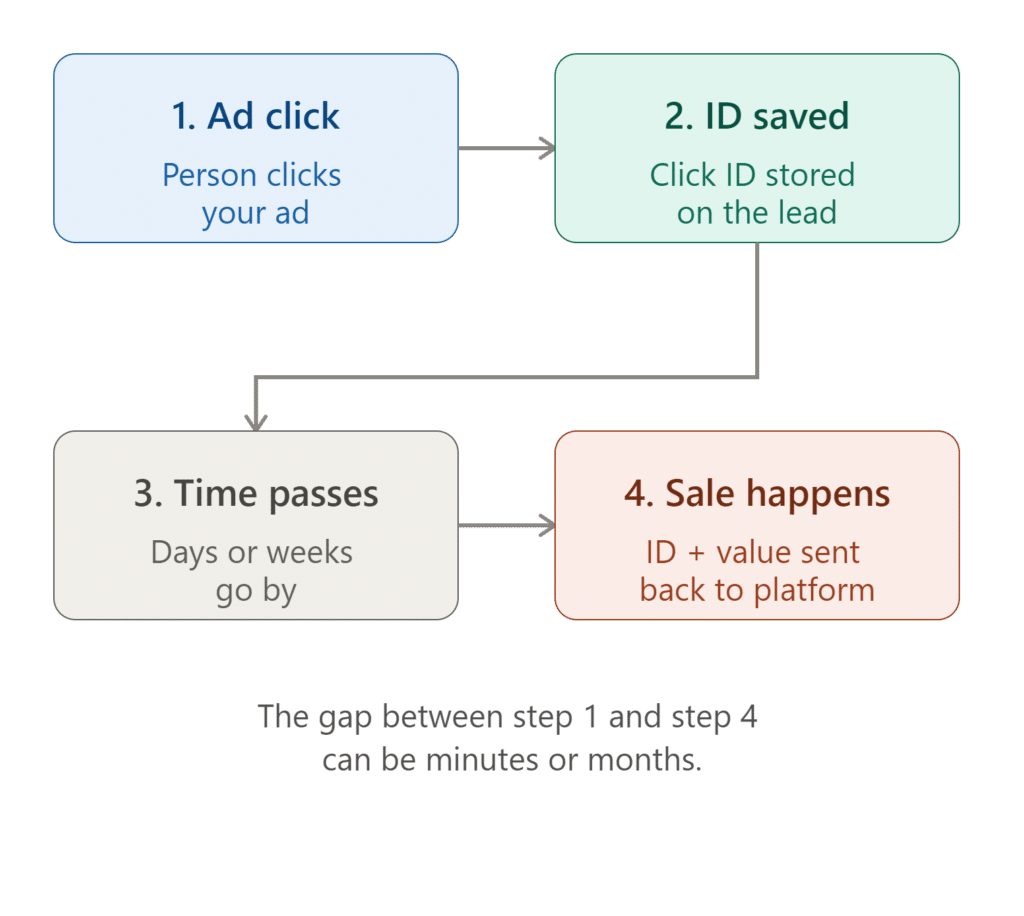
Figure 1: The offline conversion loop for a lead-generation business. The gap between step 1 and step 4 can be minutesor months, which is exactly why the Click ID (and, ideally, hashed contact data alongside it) needs to be captured and safely stored the moment step 1 happens.
2.5 Conversion windows: how much time you actually have
A conversion window is simply the maximum amount of time an ad platform will wait, after an adclick, before it stops accepting a matching conversion for that click. If your sales cycle is longer thanthis window, genuine sales will fail to attribute, not because anything was set up wrong, but because the window closed before the sale happened.
In Google Ads specifically, this window defaults to 30 days if never customized, but can be adjusted anywhere from 1 to 90 days depending on the conversion source. There is also an important,easy-to-miss detail: the absolute outer limit differs depending on which matching method is used.Offline conversions matched purely by Click ID stop being accepted after 90 days from the original click. Conversions matched using hashed personal data under Enhanced Conversions for Leads havea shorter outer limit of 63 days from the original click.
Why This Matters for Longer Sales Cycles
A business whose average deal takes 45 days to close, from first form-fill to signed payment, iswell within the 90-day Click ID limit but could bump against the 63-day Enhanced Conversions forLeads limit if uploads aren't consistent.
The practical fix is straightforward: know your own average sales cycle length, set the conversion window setting to comfortably cover it, and upload conversions on a steady, frequent schedule (daily is recommended) rather than in occasional large batches
2.6 A 2026 update: the two features are merging
Google has announced that Enhanced Conversions for web and Enhanced Conversions for Leads,historically presented as separate settings requiring a choice of implementation method, are beingcombined into a single on/off setting. Starting in April 2026, Google Ads began simultaneously accepting user-provided data from website tags, Data Manager, and API connections at the same time,rather than requiring a single chosen method. Starting in June 2026, the two features were combined into one simple switch, with existing accounts automatically migrated over without requiring any action.
In practical terms, this means a business no longer has to think of these as competing choices. Asingle toggle now governs both, and data can arrive from a website tag and a CRM automation at thesame time, complementing each other rather than overriding one another.
KEY TAKEAWAY
Conversion windows and upload frequency are not minor technical settings. They directly decide whether a genuinely closed sale ever reaches the ad platform at all. Match thewindow to your real sales cycle, and upload consistently, ideally daily.
Part 3: Enhanced Conversions for Web — The Complete Guide
This section is for Case A businesses from Part 1: the ones where the actual sale, booking, or sign up happens right there on the website, in the same moment the visitor is present.
3.1 What it is, and why it's simpler than the leads version
Because the sale already happens on the website, there is no gap in time to bridge, no Click ID that needs to survive weeks inside a CRM. The website already knows the exact moment a purchase happens. Enhanced Conversions (without "for leads" at the end) is about making that already-known moment reported more accurately, by sending securely scrambled proof of the buyer's identity, most often their email address, alongside the purchase event itself.
Why Extra Proof of Identity Helps at All
Two people click the same ad from two different devices. Relying on browser cookies alone, an ad platform might fail to realize this was ever the same person, especially if one device has strictprivacy settings. Sending a scrambled version of their email alongside the purchase lets the platform confidently confirm "yes, this is the same person who clicked our ad," recovering a match that cookies alone would have missed.
3.2 The three ways to implement it
Google offers three distinct methods for collecting this data on a website, and it's worth understanding all three, since the right choice depends entirely on how a website is built:
Method 1: Automatic detection
The simplest option. Google's tag scans the confirmation page for text patterns that look like an email address, phone number, or name, and uses whatever it finds automatically. This requires the least setup effort and works well for many standard websites, but it depends entirely on the relevant information being visible in the page's own content, in plain HTML that the tag is actually allowed to read.
Method 2: CSS selectors or JavaScript variables
A more precise, manually pointed version of the same idea: instead of scanning the whole page, you tell Google's tag exactly where on the page the customer's details live, using a technical reference tothat exact spot (a CSS selector) or a stored variable name in the page's code. This avoids false matches and works even when automatic detection would otherwise miss the details or pick up the wrong text.
Method 3: A code snippet
The most reliable and most commonly recommended method for anyone with development resources.A small script is added to the confirmation page that explicitly hands the customer's details to Google's tag the moment the page loads, using a specific, documented format. Because the data is handed overdirectly and deliberately, rather than guessed at or scanned for, this method is the least likely to silentlyfail, and is required in situations where the other two methods cannot reach the data at all, such as forms embedded from another company's tool (see Part 4).
3.3 Hashing, Explained Simply and Accurately
Both Enhanced Conversions and Enhanced Conversions for Leads rely on hashing, and it's worthunderstanding exactly what this word means, since it's central to why this data can be shared safely.Hashing is a one-way mathematical scrambling process. Feed it "[email protected]" and it alwaysproduces the same long, meaningless-looking string of characters. Critically, this process cannot bereversed: there is no way to start from the scrambled string and recover the original email address. Thespecific method used here is called SHA-256, a widely trusted standard.
This is what makes the exchange privacy-respecting rather than a raw data handover: the ad platform receives a scrambled fingerprint of the customer's email, which it can compare against its own records(also scrambled the same way) to check for a match, without ever seeing the original, readable email address itself.
In practice, most implementations send the plain, unscrambled data (such as "[email protected]")directly to Google, and Google performs the scrambling on its own servers the instant it arrives, before anything is stored. It is also possible to perform the scrambling yourself, on your own website, beforethe data ever leaves your server, for businesses that prefer an extra layer of caution.
3.4 The Data Fields That Actually Matter
At least one of the following needs to be provided for Enhanced Conversions to function at all:
Email address — the preferred and most reliable field.
Full name and address — first name, last name, postal code, and country are required together;street, city, and region can be added for extra confidence.
Phone number — can be provided, but only alongside either an email or a full name andaddress, never entirely on its own.
It's also possible to send more than one value for the same field, up to three email addresses or phone numbers, and up to two full addresses, in a single conversion. This matters for real situations such as someone using a work email to click an ad but a personal email to complete checkout: providing both increases the likelihood of a correct match.
KEY TAKEAWAY
Pick the implementation method that matches how a website is built, not the one that sounds most advanced. A code snippet is the most reliable, but automatic detection isoften enough for a simple, standard site.
Part 4: The iframe Problem: Why Third-Party Forms Break Tracking
A huge number of real websites don't build their own forms. Instead, they borrow one from another company's tool, a CRM, a scheduling app, a quiz funnel, and simply display it inside the page. This is extremely common and usually invisible to a visitor. It is also one of the single most common reasons Enhanced Conversions quietly fails to work at all.
4.1 What an iframe Actually Is
The TV-in-the-Wall Analogy
Imagine a small TV screen mounted into the wall of a room, showing a live feed from somewhere else entirely. It looks like part of the room's decor, blending in perfectly, but it is technically a separate broadcast, not something the room itself controls. In web development, this borrowed,embedded piece of another website is called an iframe (short for inline frame). It is an entirely standard, legitimate technique, used everywhere from embedded YouTube videos to payment forms to appointment schedulers.
Why This Restriction Exists in the First Place
Every modern browser enforces a rule called the same-origin policy: a webpage cannot freely reach into and read the contents of an embedded iframe that comes from a different website, and vice versa.This is not an arbitrary inconvenience, it is one of the most important security protections on the entire web. Without it, any website you visited could silently read whatever was inside an embedded banking login, email inbox, or payment form sitting on the same page, regardless of who actually built it. The same rule that keeps that scenario impossible is the rule that quietly gets in the way of tracking a form submission inside an embedded CRM form.
4.2 Why Automatic Detection and CSS Selectors Both Fail Here
Both of the first two Enhanced Conversions methods from Part 3, automatic detection and CSS selectors, depend on being able to look directly at the content of the page. Because the same-origin policy blocks exactly that kind of direct look into an embedded iframe, neither method can see theemail, phone number, or name someone just typed into a third-party form, even though the form visually appears to be sitting right there on the page. This isn't a bug in the setup. It is the browser correctly doing its job.
4.3 The Fix: A Note Passed Under the Door
Not every embedded form tool sends this kind of note automatically, so it's worth checking the specific tool's own documentation, or testing it directly, before assuming this works out of the box.
The Note-Under-the-Door Analogy
Even though the room can't walk into the TV screen's world and look around uninvited, the TV screen can still choose to slide a note out under the door, sharing exactly what it wants to share,on its own terms. In technical terms, this "note" is a small message a well-built iframe form can voluntarily send out to the surrounding page the moment someone submits it, known as a post Message. Someone (typically a developer, or a tool built specifically for this purpose) sets upthe main website to listen for that note and read the details inside it. Once that listener is in place,the data can be picked up and handed to Enhanced Conversions using the code snippet method from Part 3, even though the form itself remains a separate, embedded iframe the whole time.
4.4 An Alternative: Redirecting to a Real Thank-You Page
Many embedded form tools offer a second option: instead of showing a success message inside theiframe itself, the visitor's entire browser is redirected to a brand new page on your own website aftersubmitting. Because that redirected page is a genuine, full page load, not an embedded iframe, thesame-origin restriction from earlier simply doesn't apply to it at all.
The remaining question becomes how the submitted details travel along with that redirect. One common approach appends them as visible parameters on the destination web address itself (for example, ending in [email protected]). This works, but it comes with a real privacy trade-off worth knowing about: anything sitting in a web address can end up recorded in server logs, passed along in referrer information to other scripts running on that same page, or saved in browser history.For any business uncomfortable with that exposure, the more careful alternative is Part 5's server-sidetracking, which delivers the same information without ever placing it in a visible web address at all.
KEY TAKEAWAY
If a form on a website is borrowed from another company's tool, check whether it livesinside an iframe before assuming automatic Enhanced Conversions detection will work. Itvery likely won't, and the fix (a postMessage listener, or a redirect to a real page) needs tobe set up deliberately.
Part 5: Server-Side Tracking, Explained From the Ground Up
So far, every tracking method described has one thing in common: the visitor's own web browser is the one doing the work of contacting Google, Meta, or TikTok directly. Server-side tracking changes who does that job, and it solves several real problems at once.
5.1 Client-Side Versus Server-Side
The Shop and the Back Office
Picture a shop. Normally, every time a customer buys something, a clerk stands right there at the counter and personally phones three separate accountants (Google, Meta, TikTok), one after another, right in front of the customer, to report the sale. This is client-side tracking, the customer's own browser making all three calls directly. Server-side tracking instead hires asmall back office, a separate, quiet room where a copy of every receipt is sent first. Someone inthat back office (a small server) then calmly makes the calls to all three accountants on their own,without the customer ever needing to see or be part of that conversation.
5.2 Why This Matters More Today Than It Used To
Three real, growing problems affect the clerk-at-the-counter approach:
Ad blockers: Many browser extensions specifically block outgoing requests to known advertisingdomains, meaning the "phone call" to Google, Meta, or TikTok can be silently cut off before it everleaves the visitor's device.
Browser privacy restrictions: Features such as Safari's Intelligent Tracking Prevention (ITP) limit how long certain tracking information can persist in a browser, weakening the connection between an early ad click and a much later purchase.
Exposure: Making every call directly in front of the customer means more of their personal information passes through, and is visible to, other scripts running on the same page than strictly needs to be the case.
Server-side tracking side steps all three at once: a request from your own server to an ad platform doesn't get caught by a browser-based ad blocker the way a request from the browser itself does, itisn't affected by browser cookie restrictions the same way, and it keeps the raw data confined to a single, controlled hop rather than exposing it to every script on the page.
5.3 How It Actually Works, Mechanically
A server-side setup typically involves a small, dedicated piece of software called a container, runningon its own server, sitting between your website or CRM and the ad platforms. The flow looks like this:an event happens (a purchase, a form submission, a CRM automation firing), that event is sent as abackground request (often called a webhook) to your own container, and the container then forwards acleaned-up, properly formatted version of that event on to Google, Meta, and TikTok, each using their own respective receiving system.
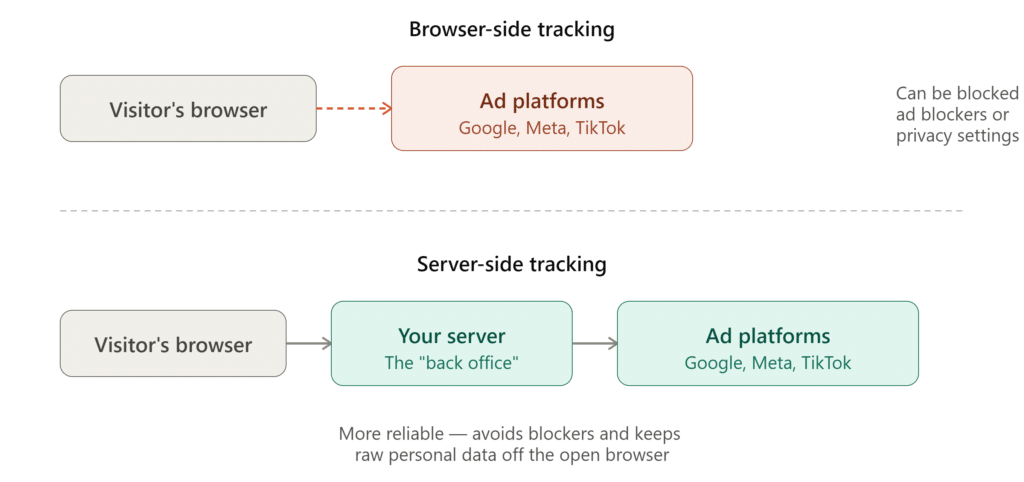
Figure 2: The same event, delivered two different ways. The bottom path adds one extra stop but avoids ad blockers,survives longer, and keeps raw personal data off the open browser entirely.
5.4 What actually needs to be set up, and by whom
The back office (the server container) needs to physically live somewhere. Managed hosting services exist specifically to rent out this space in a ready-made form, so a business doesn't need to build server infrastructure from scratch. Renting the space, however, is the easy part. Someone still needs to configure what that container actually does: connecting it to receive events from the website or CRM,and wiring up the correct outgoing connections to Google Ads, Meta's Conversions API, and TikTok's Events API.
There is also typically one small, one-time change required on the existing website's domain settings: a new address, such as data.yourwebsite.com, needs to be pointed at the rented server space using a DNS record (a setting inside wherever a domain's technical settings are managed). This does not touch, move, or affect the existing website hosting in any way, it simply creates a new, separate address that quietly routes to a different destination, in the same way many businesses already use a separate address like mail.company.com for email services distinct from their main website.
Being honest about the effort involved
Renting the back office space is inexpensive and quick. Configuring what happens inside it, andcorrectly connecting it to three different advertising platforms, is genuine, one-time technicalwork. For most businesses without an in-house developer, this is a task worth paying a specialistto set up once, rather than a place to spend time learning from scratch. Done-for-you connectortools also exist that package this entire process into a more guided, less hands-on product,usually at a recurring subscription cost instead of a one-time setup fee.
KEY TAKEAWAY
Server-side tracking doesn't replace anything covered in Parts 2 through 4. It changes how the event gets delivered once it exists, more reliably, more privately, and to multiple platforms at the same time.
Part 6: Sending One Conversion to Google, Meta, and TikTok at Once
Almost no serious advertiser runs ads on only one platform. The same underlying question, "did this person actually become a customer, and what were they worth," needs to reach every platform being advertised on, not just Google.
6.1 Each Platform Has Its Own Version of the Same Idea
Google's Enhanced Conversions has direct equivalents on the other major advertising platforms, using the same underlying principle (hashed contact details, sent alongside a conversion event, to improve matching accuracy) under different names:
Meta calls its version Advanced Matching, and its server-to-server delivery system the Conversions API, often shortened to CAPI.
TikTok calls its version Advanced Matching as well, delivered either directly from the browser(its Pixel) or server-to-server through its Events API.
6.2 Meta: Advanced Matching and the Conversions API
Meta's system accepts a defined set of hashed identity fields alongside each event: email, phone number, first name, last name, city, state, ZIP code, date of birth, gender, country, and an optional internal customer identifier. The same field set is used whether the data travels from the browser (Advanced Matching via the Pixel) or from a server (the Conversions API), the only difference is the channel it travels through.
When the same event is sent through both channels at once, Meta requires a shared reference code (called an event ID) attached to both copies, so that it can recognize them as the same event rather than counting the sale twice. Meta also scores how well a business's matching data performs through something called an Event Match Quality score, giving a concrete, trackable number that reflects how completely and correctly identity data is being sent along with each event.
6.3 TikTok: Advanced Matching and the Events API
TikTok's browser-side Pixel accepts a hashed email address and phone number through a specificinstruction (called identify) as part of its tracking code, associating that identity information with allevents that follow. Its server-to-server equivalent, the Events API, accepts the same kind of identitydata delivered directly from a server rather than a browser, following the same underlying logic described throughout this guide: a server-side delivery is more resilient than a browser-side one alone.
6.4 Deduplication: Why Sending the Same Event Twice Needs a Safeguard
Why This Matters
Consider a business using both a browser-based pixel and a server-side setup for redundancy.Without a shared reference ID, a single sale could genuinely arrive at Meta or TikTok twice, oncefrom the browser, once from the server, and get counted as two separate sales, quietly inflating every report and misleading the algorithm about how well campaigns are actually performing. Attaching the same event ID to both copies solves this: the platform recognizes the second copyas a duplicate of the first and simply discards it, rather than double-counting
KEY TAKEAWAY
Running ads on more than one platform means every conversion needs to reach every platform being advertised on, not just Google. If a business already invests in server-side tracking for Google, extending the same setup to Meta's Conversions API and TikTok's Events API is usually a modest additional step, not a separate project.
Part 7: Common Mistakes That Quietly Break Tracking
Every mistake in this section shares one trait: none of them throw an obvious error message. Tracking looks like it's working, dashboards still show numbers, and yet the data quietly stops being trustworthy.These are worth checking deliberately, not just assuming are fine.
7.1 Currency Mismatches
If a business collects payment in one currency but its ad account is set up in another, every conversionvalue needs an explicit currency code attached to it (using standard three-letter codes, such as USD or PKR). Ad platforms support this deliberately, and will automatically convert correctly when the currencyis labeled. Left unlabeled, a raw number can be misread as if it were already in the account's own currency, silently distorting every value-based decision the bidding system makes from that pointforward.
7.2 Click ID Capture Gaps
As covered in Part 2.3, a Click ID only has one chance to be captured, at the very first visit. Common,invisible causes of missing Click IDs include a URL redirect stripping the parameter before the visitor reaches the actual form, or a form that was never configured to store the field in the first place.Periodically sampling recent leads and checking whether the Click ID field is actually populated is a simple, worthwhile habit.
7.3 The Conversion Action Isn't Actually Being Used for Bidding
Sending good data back is only half the job. A conversion action can exist, receive real data, and stillbe excluded from the account's main "Conversions" column, meaning it is being recorded but notactually influencing which ads get shown or how bids are set. This setting is worth checking directly,rather than assumed, whenever a new conversion action is created.
7.4 A Conversion Window Shorter Than the Real Sales Cycle
Covered in depth in Part 2.5: if a typical sale takes longer to close than the configured conversion window allows, genuinely real sales will simply fail to attribute once that window closes. Matching the window setting to an honest, realistic view of the sales cycle avoids this quietly losing real data.
7.5 Double-Counting the Same Event
A subtle mistake that can happen when combining approaches from this guide: firing the sameconversion through two separate mechanisms at once, for example, both a live postMessage listenerfrom Part 4 and a separate page-view trigger on a thank-you page. Whenever a redirect to a realthank-you page is reliable, that page-view trigger alone is usually the cleaner, simpler signal, and any earlier, more complex live listener should be turned off to avoid firing the same conversion twice.
7.6 Expecting Results in Days Rather Than Weeks
Sending better information doesn't change bidding behavior overnight. Platforms need a real,accumulated pattern of matched conversions before adjusting how they spend. Official guidance recommends performing uploads consistently for at least one, and ideally up to two, full conversion cycles before expecting a conversion action's data to be fully reflected in bidding decisions. For a business whose sales cycle runs several weeks, this means the realistic timeline to see a measurable shift is measured in weeks, not days.
KEY TAKEAWAY
None of the mistakes in this section produce an obvious error. All of them are worth actively checking for, rather than assumed to be fine simply because a dashboard still shows conversion numbers.
Part 8: Frequently Asked Questions
What is the difference between Enhanced Conversions and Enhanced Conversions for Leads?
Enhanced Conversions applies when a sale happens directly on a website, improving the accuracy of that same-moment tracking. Enhanced Conversions for Leads applies when the real sale happens later, away from the website, such as after a phone call or CRM update, and is built specifically tobridge that gap in time. As of a 2026 update, both are being combined into a single on/off setting inside Google Ads.
Do I need this if I already track offline conversions using a Click ID?
A Click ID (GCLID, FBCLID, or similar) on its own is a valid and working way to match a later sale backto an ad click. Enhanced Conversions for Leads adds hashed contact details as a second, backupmatching method, catching conversions where the Click ID was lost, never captured, or expired. Using both together is more reliable than either alone.
Can this work with forms from a third-party tool embedded on my website?
It depends on how that form is embedded. If it sits inside an iframe (see Part 4), the usual automatic detection methods will not be able to see what was typed into it, due to a standard browser security rule. A working fix exists, either listening for a message the form sends out on submission, or redirecting to a real thank-you page on the main domain, but it needs to be deliberately set up rather than assumed to work automatically.
Is server-side tracking necessary for a small business?
Not always immediately. It becomes genuinely worthwhile once a business advertises on more thanone platform, notices real gaps between recorded conversions and known sales, or wants to reducehow much raw personal data passes through the browser. For a business just starting out with a singlead platform and simple, direct tracking, the earlier parts of this guide are usually enough on their own.
What is a Click ID, and why does it expire?
A Click ID is a unique code attached to a web address the moment someone clicks an ad, acting as a reference number that lets a later sale be matched back to that original click. It has a limited life span,commonly up to 90 days for standard Click ID matching and 63 days for hashed-data matching under Enhanced Conversions for Leads, after which the ad platform will no longer accept a conversion referencing it.
Will this work if my business only collects leads, with no direct online purchase?
Yes. This is exactly the scenario Enhanced Conversions for Leads is built for. The key requirement is capturing and storing a Click ID (or hashed contact details) at the moment the lead first arrives, and then reporting the actual sale back later, whenever it genuinely happens.
How long does it take to see results after setting this up?
Data can begin appearing within a few days of implementation, but meaningfully changed bidding behavior takes longer. Platforms need a real, accumulated pattern to learn from, and official guidance recommends allowing at least one to two full conversion cycles before expecting the impact to fully show. For longer sales cycles, this realistically means weeks, not days.
What happens if I send a conversion value in the wrong currency?
If a currency code is not explicitly attached to a conversion value, the ad platform may interpret the number as if it were already in the account's own billing currency. If the actual currency is worth significantly less or more, this can badly distort reported conversion value and mislead any bidding strategy based on that value.
Do I need a developer to set any of this up?
It depends on the specific piece. Turning on account-level settings is usually simple enough for a non-technical marketer. Adding a code snippet, setting up a post Message listener for an embedded form, or configuring server-side tracking are genuine technical tasks, and are best handled by a developer or a specialist, rather than attempted without relevant experience.
Is my customers' data safe when it's sent to Google, Meta, or TikTok this way?
The identifying details involved (email, phone, name) are typically sent as, or immediately convertedinto, a one-way scrambled version (commonly SHA-256 hashing) before being used for matching. Thisscrambled version cannot be reversed back into the original readable detail. Server-side tracking additionally reduces how much of this data ever passes through the open browser at all.
What's the practical difference between GCLID, FBCLID, and TTCLID?
All three serve the identical purpose, a unique reference code attached at the moment of an ad click,but each belongs to a different platform: GCLID to Google, FBCLID to Meta, and TTCLID to TikTok. A business running ads on all three needs to capture and store all three separately, since one platform's Click ID cannot be used to report a conversion to a different platform.
Can Enhanced Conversions and Enhanced Conversions for Leads be used at the sametime?
Yes, and following a 2026 update, this is now the default expectation rather than an advanced configuration. The two features have been combined into a single on/off setting, and Google Ads nowaccepts data from website tags and CRM-based uploads simultaneously, rather than requiring a single chosen method.
Part 9: Glossary of Terms
Every technical term used in this guide, gathered in one place for quick reference.
Enhanced Conversions
A Google Ads feature that improves the accuracy of conversions tracked directly on a website, by sending securely scrambled customer details alongside each conversion event.
Enhanced Conversions for Leads
An upgraded form of offline conversion import, designed for businesses where the real sale happens awayfrom the website, using both a Click ID and scrambled customer details to match a later sale back to its original ad click.
Offline Conversion
Any conversion reported to an ad platform after the fact, because the actual sale happened somewhereother than on the website itself at the moment of the ad click.
Click ID
A general term for a unique reference code attached to a web address the instant someone clicks an ad,used to match a later conversion back to that specific click.
GCLID
Google's specific version of a Click ID, attached when someone clicks a Google Search, Shopping, or Display ad.
GBRAID / WBRAID
Google's versions of a Click ID used specifically for certain app-based and privacy-restricted browser environments.
FBCLID
Meta's version of a Click ID, attached when someone clicks a Facebook or Instagram ad.
TTCLID
TikTok's version of a Click ID, attached when someone clicks a TikTok ad.
Conversion Window
The maximum amount of time an ad platform will wait, after an ad click, before it stops accepting a matchingconversion for that click.
Hashing (SHA-256)
A one-way scrambling process that turns readable text, such as an email address, into a fixed,meaningless-looking string that cannot be reversed back into the original.
iframe
An embedded piece of one website displayed inside another, commonly used for third-party forms, videos,and widgets.
Same-Origin Policy
A core browser security rule preventing a web page from freely reading the contents of an embedded iframe that comes from a different website.
postMessage
A message an iframe can voluntarily send out to the surrounding webpage, used as a workaround to share form data despite the same-origin policy.
Server-Side Tracking
An approach where conversion events are sent first to a business's own server, which then forwards themon to advertising platforms, rather than the visitor's browser contacting each platform directly.
Server-Side Container
The small, dedicated piece of software, running on a rented or self-hosted server, that receives conversion events and forwards them on to advertising platforms.
Webhook
An automated, background message sent from one system to another the instant a specific event happens,commonly used to notify a server-side container that a conversion has occurred.
Conversions API (CAPI)
Meta's server-to-server system for receiving conversion events directly from a business's server, rather thansolely from a browser-based pixel.
Events API
TikTok's server-to-server system for receiving conversion events directly from a business's server.
Advanced Matching
Meta and TikTok's terms for sending hashed customer identity details alongside a conversion event, to improve matching accuracy, equivalent to Google's Enhanced Conversions.
Event Match Quality (EMQ)
A score Meta provides reflecting how completely and correctly a business is sending identity-matching dataalongside its conversion events.
Deduplication / Event ID
A shared reference code attached to two copies of the same event (for example, one from a browser pixeland one from a server), allowing the receiving platform to recognize them as duplicates and avoid counting the same sale twice.
Smart Bidding
Google Ads' automated bidding system, which adjusts how much to bid for ad placements based on the conversion data it has been given access to.
Attribution
The process of connecting a conversion back to the specific ad, keyword, or campaign that originally led to it.
Part 10: References & Further Reading
This guide draws directly on Google's own official documentation. Each source below is worth reading
in full for anyone implementing these features hands-on.
- About Enhanced Conversions for web
https://support.google.com/google-ads/answer/15712870 - About Enhanced Conversions for leads
https://support.google.com/google-ads/answer/15713840 - Set up Enhanced Conversions for web using the Google tag
https://support.google.com/google-ads/answer/13258081 - Updates to your Enhanced Conversions settings (the 2026 merge)
https://support.google.com/google-ads/answer/16884284 - Set up offline conversions using Google Click ID (GCLID)
https://support.google.com/google-ads/answer/7012522 - About conversion windows
https://support.google.com/google-ads/answer/3123169 - Guidelines for importing offline conversions
https://support.google.com/google-ads/answer/15081888 - Offline conversion imports FAQs
https://support.google.com/google-ads/answer/10029210 - Import conversions from ad clicks using files (currency field)
https://support.google.com/google-ads/answer/7014069 - Add a code snippet for user-provided data (gtag reference)
https://support.google.com/analytics/answer/14171598 - Manage offline conversions, Google Ads API developer documentation
https://developers.google.com/google-ads/api/docs/conversions/upload-offline - GoHighLevel: Add to Google Ads workflow action (official documentation)
https://help.gohighlevel.com/support/solutions/articles/155000003368-workflow-action-add-to-google-adw
ords
For Meta's Conversions API and Advanced Matching, and TikTok's Events API and Advanced Matching, consult each platform's own official Business or Developer help center directly, since implementation details and supported fields are updated independently of Google's documentation.
Quick-Reference Cheat Sheet
This guide is intended as a plain-language reference, not a step-by-step technical manual. Actual implementation,writing tracking code, configuring server-side containers, wiring up CRM automations, is best handled by whoever manages a website or ad accounts technically.
| If your situation is... | What you likely need |
|---|---|
| My website only collects interest (forms, calls). The real payment happens later,elsewhere. | Enhanced Conversions for Leads • a stored Click ID • an automation that reports back once the deal is won (Part 2) |
| My website takes payment directly (a purchase, a booking, a subscription). | Regular Enhanced Conversions on the confirmation page (Part 3) |
| My form is borrowed from another company's tool and sits inside my page. | Check for the iframe problem first, then a post Message listener or a real thank-you page redirect (Part 4) |
| My sales cycle is longer than a few weeks. | Widen the conversion window to match it, and upload conversions daily (Part 2.5) |
| I advertise on Google, Meta, and TikTok and want one event to reach all three reliably. | Server-side tracking, with a shared event ID for deduplication (Parts 5 & 6) |
| Numbers look off, or conversions seem to be missing. | Work through Part 7 in order: currency, Click ID capture, bidding inclusion, conversionwindow, double-counting, patience |
This guide is intended as a plain-language reference, not a step-by-step technical manual. Actual implementation,writing tracking code, configuring server-side containers, wiring up CRM automations, is best handled by whoever manages a website or ad accounts technically.
